Machine-Readable Runbook Engineering
Introduction
Milestone 1 of the Secure AI SOC Workflows project revolved around the creation of a SOC Runbook that was both machine and human-readable. Traditionally, and throughout my career, I have written dozens of SOC Runbooks which provide high-level detail for human analysts to leverage during signal triage and incident response. This phase taught me that many patterns, design choices, and the syntax of such runbooks constrain and bottleneck them for machines, such as cross-referencing steps by number and steps whose logic depends on information scattered across earlier, non-adjacent content. A human reader can piece this together by scanning back through the document, but a retrieval system may only surface the specific chunk being queried, unknowingly losing the context it depends on.
This project served as a fantastic opportunity to research, learn, and implement these key differences and forms the foundational building block for my Secure AI SOC Workflows project, as all of the later milestone phases will rely heavily on this machine-readable runbook and its outcomes. The goal of this milestone was to research, learn, and implement a SOC Runbook on my chosen area of signal triage: Phishing, made specifically for an AI LLM to provide efficient and accurate guidelines to SOC at query time for the given signal context.
In this project, we will be utilising RAG, which stands for retrieval augmented generation, and is an emerging industry practice allowing for the retrieval of a live, editable knowledge base at query time rather than static procedures baked into system prompts or fine-tuning AI models entirely. Fine-tuning is the other common alternative to static prompting, but it is slower and costlier to update every time a procedure changes, and does not ground responses in a live, editable source the way retrieval does. In other words, at query time, we are creating a pipeline which returns a fast and efficient response to SOC on instructions for signal triage, including investigation, remediation, response, escalation, and more.
In a traditional SOC environment, every time a signal fires, a decision is made regarding runbook routing, either manually or automatically. Manual routing relies on an analyst correctly identifying which runbook applies, which is slow under signal volume and inconsistent across shifts. Automatic routing, typically built on hardcoded keywords or rule matching, is brittle — it only catches phrasing the rules were explicitly written to anticipate, and misses real-world variance in how alerts and user reports are actually worded.
In a real SOC, dozens of runbooks are typically utilised on a daily basis, spanning all kinds of scenarios and attack contexts. E.g. Phishing, Web Attacks, Data Destruction, Company Policy Violations, and more. Static system prompts means forcing all of these runbooks inside of system prompt templates regardless of their relevance to the current matter, constraining model efficiency and increasing the overall noise and complicating routing logic. RAG's retrieval step is this exact routing logic. Static implementations provide an "all or nothing" approach, while RAG's chunking, handled below by defining trigger phrases which are later described in more detail in the key takeaways, means that retrieval is able to find exactly the information SOC requires, at query time, and return that in a message. If a runbook is changed, RAG re-indexes and updates the document. System prompts or application logic do not require a change, meaning our RAG system is de-coupled from existing architecture. A RAG knowledge base also provides access controls and governance, covered in later milestones, allowing SOC to scope which documents a given query context can retrieve from.
This milestone was inspired by my on-going training through the CompTIA Security AI+ qualification, where I have been introduced to multiple use cases for the implementation and leverage of AI in SOC workflows. To begin this project, I firstly researched RAG in greater detail, noting its best practices for its application to SOC Runbooks.
Phishing Runbook in Markdown
# SOC Runbook: Phishing

## Purpose

This runbook covers user-reported phishing emails and automated phishing campaigns detected by our email security tool, PhishHero. It provides detailed investigative steps and guidance for triage, investigation, and remediation.

**In scope:**
- User-reported phishing emails
- Automatic detections by our email security tool PhishHero

**Out of scope:**
- Successful compromise — pivot immediately to SOC Runbook: Account Compromise

### Workflow Overview

```mermaid
flowchart TD
    A1[User reports phishing email] --> B[Triage: sender, content,\nauthentication, artifacts]
    A2[PhishHero detects campaign] --> C[Triage: blast radius, HVT,\ncontent variance, sampling]
    C --> B
    B --> D{SOC verdict}
    D -->|Malicious| E[Quarantine/purge,\nblock sender, DNS block]
    E --> F{Credentials entered?}
    F -->|Yes| G[Pivot: Account Compromise runbook]
    F -->|No| H[Document & log]
    D -->|Spam / not phishing| H
    D -->|Suspicious / inconclusive| I[Escalate to L3]
    E --> J{Large blast radius\nor HVT targeted?}
    J -->|Yes| I
    J -->|No| H
    I --> H
```

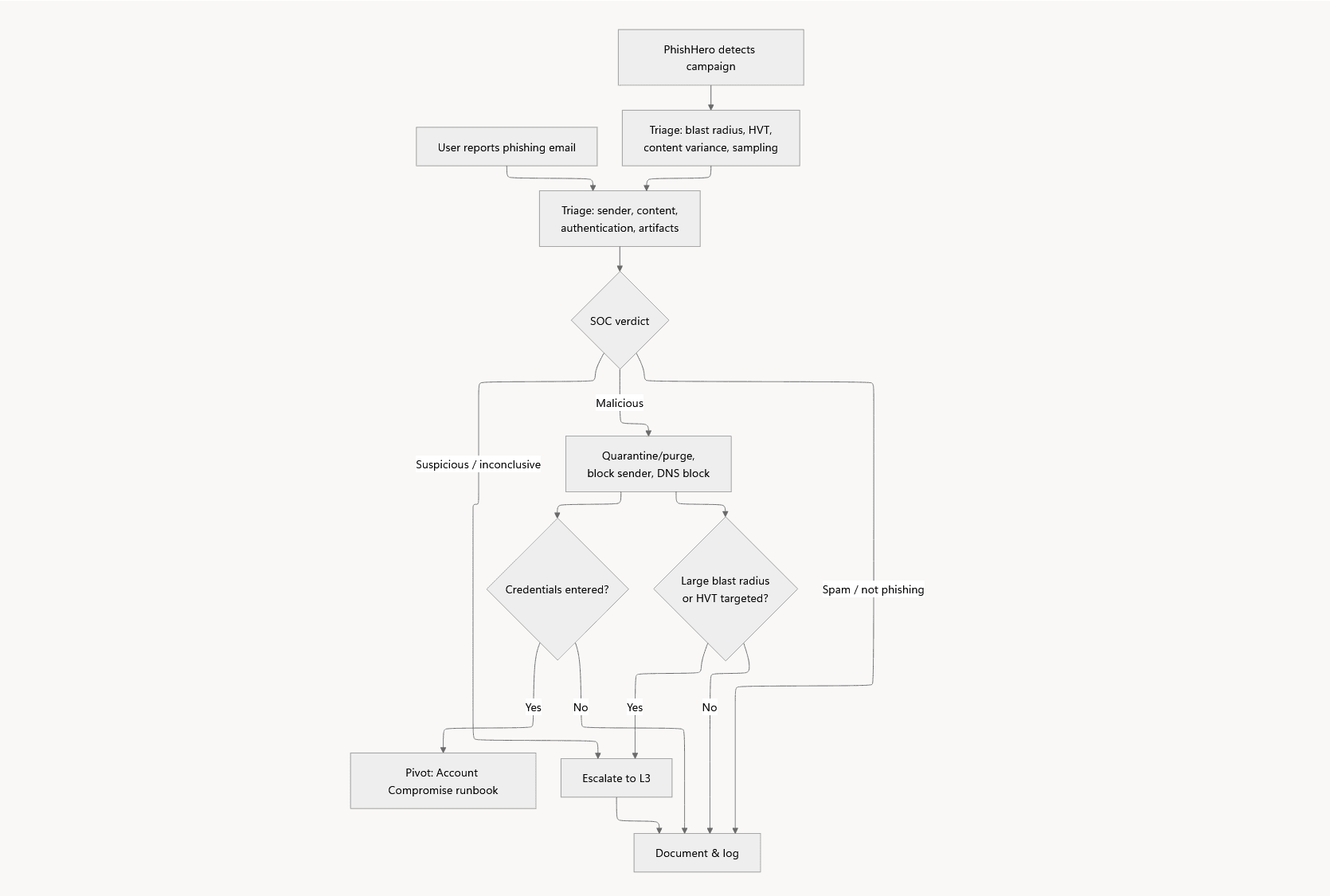
The diagram above shows both trigger paths converging into a shared classification and remediation flow. Once an email or campaign is confirmed malicious, it's contained, and escalated further if credentials were compromised or the incident meets the scale/HVT thresholds. Every outcome is logged.

### User-Reported Phishing Email

trigger_phrase: "user reported phishing email"

"If a user has reported an email as phishing, follow the steps below to verify, investigate, and respond"

**Summary:** This section covers verifying a reported email's authenticity, checking for user interaction, and containing confirmed threats.

1. Review any additional comments submitted by the reporting user. Users may add context (e.g. "this looks like our IT team but the domain seems wrong") that accelerates triage.
2. Record how many users have reported this email. Determine whether this is an isolated report or whether multiple users or departments have flagged the same message — a multi-user report is a stronger signal of an active campaign.
3. Check whether any recipients are a High-Value Target (HVT), such as admin users, the CEO, or the CISO. Any HVT recipient escalates priority, and priority should be treated as highest if the recipient is later confirmed to have interacted with the email or its artifacts.
4. Analyse the email content and classify its likely intent. Look for indicators such as urgency or threat language, impersonation of internal employees or executives, and mimicry of trusted brands (e.g. Microsoft, Amazon, Google).
5. Determine whether the sender is internal or external. Locate the message in PhishHero by searching the subject line or sender address.
6. Check the sender and domain's message history. Review how many prior messages are associated with this sender/domain, and whether the organisation has a history of legitimate interaction with them.
7. Confirm whether the domain is a known or approved supplier. Query the domain against the company knowledge base (Notion) to check for an existing vendor relationship.
8. Flag free-mail domains as a phishing indicator. Free-mail domains (e.g. gmail.com, outlook.com) used for supposed business correspondence should be treated as suspicious — legitimate organisations do not typically conduct business communication from consumer email providers.
9. Verify sender authentication results. Check the email's SPF, DKIM, and DMARC results via PhishHero → Message Trace. A "fail" or "softfail" on any of the three checks is a strong phishing indicator. A "pass" on all three does not rule out phishing — authenticated domains can still be malicious or compromised — so continue regardless of this result. The combined findings from the sender, domain, and authentication checks above directly determine the artifact analysis approach below.
10. Analyse any email artifacts (links, attachments) using the sandbox appropriate to sender confidence:
    - Internal or unconfirmed sender — use the private sandbox via the app.any.run enterprise account.
    - Confirmed external sender — additional threat intelligence tools may be used, including VirusTotal, GreyNoise, AbuseIPDB, and Cisco Talos Intelligence.
    The outcome of artifact enrichment should directly support the SOC verdict on email classification (spam, safe, malicious).
11. Compare against PhishHero's recommended classification. Review the classification PhishHero assigns to the message and confirm whether it aligns with the SOC verdict formed above. If they disagree, the analyst's verdict takes precedence, but the discrepancy should be logged for detection-tuning review.
12. Finalise classification and proceed accordingly:
    - Malicious — quarantine or purge the message org-wide via PhishHero, and check for evidence of user interaction inside PhishHero (link clicks, credential entry, attachment execution).
      - Confirm removal by re-searching the subject/sender in PhishHero after action; if any instance remains, repeat the action before proceeding.
      - Block the full sender address or domain in PhishHero to prevent future malicious communications from this sender.
      - Create a DNS Traffic Policy to block outbound connections to any identified malicious URLs.
    - If an HVT was targeted — escalate to L3 SOC Analyst for incident-level review, in addition to standard remediation.
    - If credentials may have been entered — pivot immediately to *SOC Runbook: Account Compromise*
    - Spam / not phishing — mark the report as closed, no further action.
    - Suspicious / inconclusive — escalate to L3 SOC Analyst for further review.
13. Document and log the final classification and any remediative action taken in the alert ticket. Document all IOCs from malicious emails in the SIEM Lookup Table for future signal enrichment. Close the signal once complete.

### PhishHero Automatic Detections

trigger_phrase: "Phishing Campaign Detected by PhishHero"

"If our email security tool PhishHero has alerted SOC regarding a suspected phishing campaign, follow the steps below to verify, investigate, and respond."

**Summary:** This section covers verifying a suspected phishing campaign's authenticity, assessing its blast radius and targeting, checking for user interaction, and containing confirmed threats at campaign scale.

1. Review the phishing campaign summary inside PhishHero. This section details the justification for the alert (e.g. "Multiple users received a suspicious email with a PDF attachment from a free-mail source").
2. Determine the campaign's blast radius. Record how many users have received emails from this sender/domain, and whether delivery was targeted (a specific group or department) or broad/random.
3. Check whether any recipients are a High-Value Target (HVT), such as admin users, the CEO, or the CISO. Any HVT recipient escalates this campaign's priority regardless of overall blast radius.
4. Check whether emails associated with the campaign vary in content, or whether the same message was sent to all recipients. Content variance may indicate a more sophisticated or targeted campaign rather than a bulk send.
5. Flag free-mail domains as a phishing indicator. Free-mail domains (e.g. gmail.com, outlook.com) used for supposed business correspondence should be treated as suspicious — legitimate organisations do not typically conduct business communication from consumer email providers.
6. Analyse email artifacts (links, attachments) across a representative sample of the campaign's emails, using the sandbox appropriate to sender confidence:
   - Internal or unconfirmed sender — use the private sandbox via the app.any.run enterprise account.
   - Confirmed external sender — additional threat intelligence tools may be used, including VirusTotal, GreyNoise, AbuseIPDB, and Cisco Talos Intelligence.
   If email content varies significantly, sample multiple variants rather than a single message, since artifacts may differ across versions. The outcome of artifact enrichment should directly support the SOC verdict on campaign classification (spam, safe, malicious).
7. Verify sender authentication results across a sample of campaign emails. Check SPF, DKIM, and DMARC results via PhishHero → Message Trace for at least one email per content variant identified above. A consistent "fail" or "softfail" pattern across the sample is a strong phishing indicator. A "pass" on all three does not rule out phishing, so continue regardless of this result.
8. Compare against PhishHero's recommended classification. Review the classification PhishHero assigns to the campaign and confirm whether it aligns with the SOC verdict formed above. If they disagree, the analyst's verdict takes precedence, but the discrepancy should be logged for detection-tuning review.
9. Finalise classification and proceed accordingly:
   - Malicious — quarantine or purge all associated messages org-wide via PhishHero, and check for evidence of user interaction across affected recipients (link clicks, credential entry, attachment execution).
     - Confirm removal by re-searching the subject/sender in PhishHero after action; if any instance remains, repeat the action before proceeding.
     - Block the full sender address or domain in PhishHero to prevent future malicious communications from this sender.
     - Create a DNS Traffic Policy to block outbound connections to any identified malicious URLs.
   - If any recipient's credentials may have been entered — pivot immediately to *SOC Runbook: Account Compromise* for each affected account.
   - If blast radius is large (e.g. exceeds 50 users) or any HVT was targeted — escalate to L3 SOC Analyst for incident-level review, in addition to standard remediation.
   - Spam / not phishing — mark the alert as closed, no further action.
   - Suspicious / inconclusive — escalate to L3 SOC Analyst for further review.
10. Document and log the final classification, blast radius, and any remediative action taken in the alert ticket. Document all IOCs from malicious campaigns in the SIEM Lookup Table for future signal enrichment. Close the signal once complete.
Rendered Mermaid Diagram
Key Takeaways
This milestone provided the opportunity for hands-on practice designing and creating a runbook readable for both human and machines. As mentioned in the introduction, several resources were utilised for best practices and design choices for machine-readable RAG documents. Additionally, key learning takeaways also stemmed from mistakes and oversights during the creation of this documentation. Given my SOC experience writing runbooks for human analysts, it was easy to slip into habits relating to styling, wording, and placement, which make runbooks more efficient for their human readers but downgrade their efficiency and reliability for machines. Therefore, this combination of guided research principles and milestone oversights led to numerous learning opportunities, summarised below. This section serves as an educational resource not only for myself, but also for future readers looking to implement RAG in SOC who may not have experience working on runbooks outside of those scoped to human analysts.
Document Structure & Purpose
The key takeaways in this section helped to shape the overall document. In this stage, the template and syntax structure were researched and implemented so that all subsequent work was consistent and efficient as machine-readable content. The first decision was to choose what type of document this needed to be. Research shows that HTML or Markdown is preferred over, let's say, PDF. I chose Markdown given my familiarity as a Notion power-user. Next was the content hierarchy, where the runbook was designed so that each section carries sufficient context to be understood independently. This is important due to LLM chunking, aiming to ensure that a retrieved chunk contains everything needed to be understood on its own, without depending on other chunks that may not be retrieved alongside it at query time. This self-containment principle shaped several later decisions during the build, including how cross-references were handled and how repeated content across sections was treated.
Clear headings and subheadings were used in order to help RAG understand the structure and context of the content, enabling better navigation and the extraction of relevant information, thus improving the quality of the generated responses. Steps inside each section would be numbered sequentially, helping to maintain clarity and coherence.
The Purpose section itself went through its own redesign. My first draft described the document's own design intent E.g. "machine and human readable" — rather than what it actually covered. This is meta-commentary about the artifact, not operational content an analyst or a query needs, and belongs in a write-up like this one rather than inside the runbook itself. Therefore the purpose was rewritten to state the scope directly: what triggers this runbook, and what falls outside of it. The in-scope and out-of-scope lists were also deliberately formatted to match one another, both as bulleted lists, rather than one as prose and one as a list. This signals to both a human reader and a machine that the two sections represent the same category of information, just with opposite values.
Session starters and transitions were also used at the start of each section, phrasing the opening line as if directly addressing the trigger scenario itself, rather than describing the section in the third person. For example, the User-Reported Phishing Email section opens with "If a user has reported an email as phishing, follow the steps below to verify, investigate, and respond" rather than a description such as "This section explains how to handle a user-reported phishing email." This mirrors how a real query or alert is actually phrased, increasing the likelihood of a strong semantic match between an incoming query and the correct section at retrieval time.
Chunk Self Containment
The core principle of this section is that retrieved chunks must be able to stand alone, since the RAG retrieval system can't guarantee that two related chunks arrive together in the same way a human can go back through a document when necessary. In light of this, each section was designed to be understood independently for both a human and machine reader. This meant that related information should be kept within close proximity, and concepts that require important constraints of context must also be included within the same paragraph or immediately adjacent paragraphs. Additionally, due to chunk limitations and unpredictability, the information had to be specific and avoid inconsistencies with terminologies and product names. For the v1 of our runbook, a fabricated tool named PhishHero was created and is referenced consistently throughout.
Both the User-Reported and PhishHero Automatic Detections sections repeat several near-identical steps, including artifact sandboxing, comparison against PhishHero's verdict, and final documentation and logging. Given that each section needs to stand alone and since retrieval may only surface one of the two sections for a given query, instructions that simply pointed to "see the other section" would be unusable if that content wasn't retrieved alongside it. This meant accepting a trade-off between traditional documentation practice, which favours writing something once and referencing it elsewhere, and RAG-readiness, which favours self-contained repetition even at the cost of a longer document.
Rather than organising sections around generic procedural stages, each section was headed and anchored to a specific trigger scenario, using a trigger_phrase field such as trigger_phrase: "user reported phishing email". This reflects how a real query or alert is actually phrased and is something I will be testing in later stages of this project.
Research recommends that abbreviations are handled centrally, with no assumptions made on an LLM's ability to reason about or guess an unfamiliar term. However, upon the v1 runbook creation, a standalone glossary was deemed unnecessary, since a glossary section has no natural trigger phrase and isn't guaranteed to be retrieved alongside the section that actually uses the term. Instead, explicit terms such as HVT (High-Value Target) were expanded on inline, at the point they were first used.
Vague scoping is another common pitfall and mistake I made throughout this milestone. Ending sentences with "etc." or "and more" is bad practice, as this is not something a machine can coherently interpret and act on the way a human analyst would. Specific, explicit steps are what the machine needs to provide efficient and accurate responses.
Runbook Steps & Phrasing
A common mistake during this phase was trying to force multiple steps or recommended actions into one step. E.g. verify who the sender of the email is, perform IOC lookup, vendor check, message history. The core principle here is not to say that nothing can be grouped, but that steps covering separate concepts must be split. This allows the machine model to interpret and relay each one precisely, rather than as one undifferentiated block. Actions that have a conditional relationship, such as confirming the sender of the email as internal or external, which requires both internal and external tooling, can be coupled and listed explicitly as sub-bullet points under the same numeric step.
Another key takeaway was that each step must start with an action, naming the specific check and stating where or how to do it rather than assuming the reader knows. E.g. "Review this," "Record that," "Check this." This ensures the step is actionable without external context, and where a steps outcome isn't immediately conclusive, explicitly stating what to do next E.g. continue, branch, or escalate, which removes ambiguity for both the analyst and the model.
Numbered cross-references were also avoided. Originally, steps referenced other steps by number, e.g. "the combined outcome of Steps 4–8 impacts this step." Looking back on the design principle that all content must be self-contained with no assumptions made about LLM chunking, this was stripped from the document, and instead, content that was necessary was duplicated in place.
Additional Learning Takeaways
Not everything covered in the research on RAG was directly applicable to the v1 of the phishing runbook. This was either because it didn't fit this milestones scope or because its value can only really be judged once the runbook is actually tested against a live RAG pipeline.
- Flat-syntax tables: Research recommends replacing regular table inserts with flat-level syntax to help LLMs digest information more reliably than a standard markdown table. This wasn't needed for v1, since the runbook doesn't currently contain tabular content, but it's a design choice worth applying if a future runbook or new version of the current runbook requires one.
- Descriptive text for visuals: The research also recommends providing descriptive text alongside any visual content, since more complex visuals require substantially more explanatory text to be genuinely useful to a retrieval system that can't interpret the image itself. A Mermaid workflow diagram was included in v1 of this runbook, with no other visuals included as of yet. The diagram is paired with a short plain-text summary of its logic, directly applying this principle.
- Error context with solutions: Troubleshooting documentation benefits from including the exact error text alongside its solution, since users often search using the literal error message they encountered, creating a direct match between the query and the relevant content. This wasn't relevant to a phishing triage runbook, but is a principle worth carrying into any future runbook that does cover system or tooling errors.
- Large document restructuring: The guidance also recommends breaking large documents into smaller, self-contained documents rather than forcing multiple topics into one large file. It's not yet clear whether this runbook is a candidate for that. Currently, v1 is a single document covering two related scenarios, but whether that's "too large" for effective chunking is something that can only really be judged once it's tested in Milestone 2/3.
Milestone Wrap-up
Overall, this milestone proved extremely useful for beginning to understand how security runbooks differ in many ways and contexts when scoped for more than just human readers. As a SOC Analyst, this work serves overall as a learning resource, a chance to gain hands-on practice, and a future concept I will be able to utilise going forward in my career. It taught me the key constraints, design choices, and best practices required for a hybrid-designed runbook, and directly builds on my ongoing CompTIA Security AI+ training, turning several of its theoretical concepts into something I've now actually designed and reasoned through myself.
This milestone also reflects a broader shift already underway across the SOC industry. As alert volumes and tooling continue to scale, more SOCs are exploring AI-assisted triage to reduce analyst fatigue and speed up response, and the documentation feeding those systems needs to evolve alongside them. A runbook written only for a human reader is no longer the full picture for a SOC exploring this direction.
Next, Milestone 2, RAG Pipeline Configuration & Architecture, will take this v1 runbook and build the retrieval pipeline around it. All changes made to the runbook from this point forward, and the reasoning behind them, will be documented and justified as part of that process, allowing me and future readers to follow the learning process and rationale clearly.